 Stopwatch Max Blog
 Apple Watch stopwatch doesn't show current lap time — here's the fix
Apple's built-in stopwatch only shows total elapsed and previous laps. Here's how to get a live current-lap display for gym sets, sprint intervals, and more.
You finish a set, hit lap, glance at your wrist — and see the time of the last set, not the one you just started. You tap around looking for a current-lap view. There isn’t one. That’s not a settings issue. It’s how Apple built it.
What Apple’s stopwatch actually shows
The native Apple Watch stopwatch gives you two things: total elapsed time, and a list of your completed laps. The current lap — the one actively running — is never shown on its own.
That works fine if all you need is a total clock. But the moment you care about this rep, this rest, this interval, you’re doing math in your head instead of watching numbers.
Where it breaks down for athletes
Between sets at the gym. You finish a set, hit lap to mark it, and start your rest. Your rest timer is now invisible — the watch shows your previous set time and your total, not how long you’ve been resting. You’re guessing.
Sprint intervals on the track. You want to see your current 400m split ticking up while you run — not the previous one after you’ve already finished it.
Any timed effort. Rowing intervals, bike sprints, swim sets.
Knowing the last lap is history. Knowing the current one is training.
The fix: two clocks on one screen
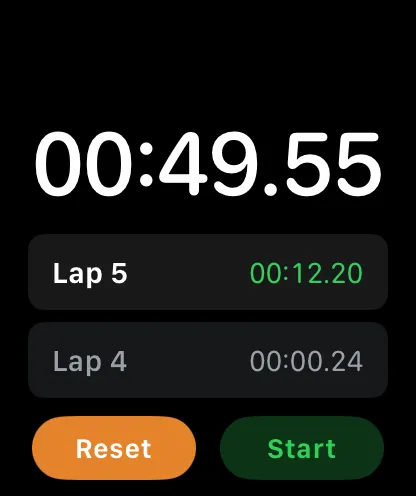
Stopwatch Max shows two live timers simultaneously: global elapsed time at the top, current lap time at the bottom — both counting up, always visible.
Finish a set and hit lap. The current-lap counter resets and starts climbing immediately. No mental math, no hunting through menus.
Capture laps without touching the screen
| Method | How | Works on |
|---|---|---|
| Double-tap | Raise wrist, double-tap fingers | Series 9, Ultra 2, and later |
| Side button | Press the physical button | Every Apple Watch |
| Siri | Say Hey Siri lap | Every Apple Watch |
Sweaty palms, chalk-covered hands, mid-rep, gloves on — pick whichever fits the moment.