Best stopwatch app for Apple Watch with lap timer in 2026
You’re on the track. Four 400m reps, two minutes rest between each. You want to know your current split as you run and your rest time ticking down between reps. You have an Apple Watch on your wrist. You open the stopwatch.
It doesn’t show what you need.
The same workout, twice
With Apple’s stopwatch:
You hit start and run the first rep. Glance at your wrist mid-stride — total elapsed time, no current lap. Fine. You finish the rep, hit lap. Rest starts. You glance down to check how long you’ve been resting. What you see is your previous rep time, not how long you’ve been standing there. You’re counting in your head.
Two reps in, you want to check your heart rate. The stopwatch doesn’t show it. You swipe to a different screen, lose your place, swipe back. End of the session, you stop the clock. The splits disappear the moment you reset. Nothing saved. Tomorrow you start from zero.
With Stopwatch Max:
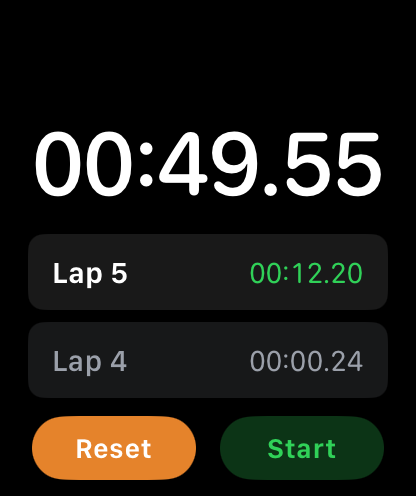
You hit start. Two timers appear immediately — global elapsed at the top, current lap ticking at the bottom. You run. You glance. You know exactly how long this rep is taking without calculating anything.
You finish the rep. Double-tap. Current lap resets. Rest timer starts climbing. You can see it. Your heart rate sits alongside both timers — one screen, no switching.
End of session, you stop the clock. The workout is saved automatically: date, total time, every split, average and max heart rate. It’s there tomorrow. It’s there next week.
What Apple’s stopwatch is missing
Current lap display. Apple’s app shows total elapsed and a list of completed laps. The lap you’re in — the one actively running — is never shown on its own. Stopwatch Max shows it live at all times, alongside the global clock.
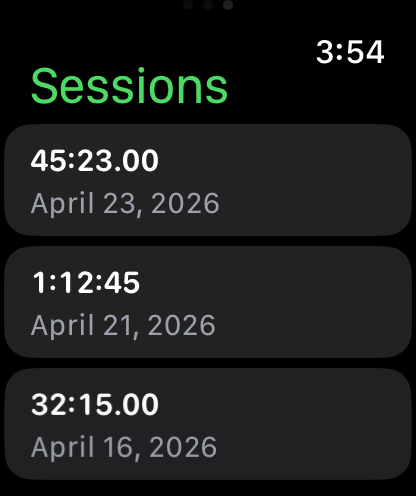
Session history. Apple’s stopwatch has no memory. Reset it and everything is gone. Stopwatch Max 1.5 saves every session automatically. Tap any entry for the full breakdown: each split, average HR, max HR.
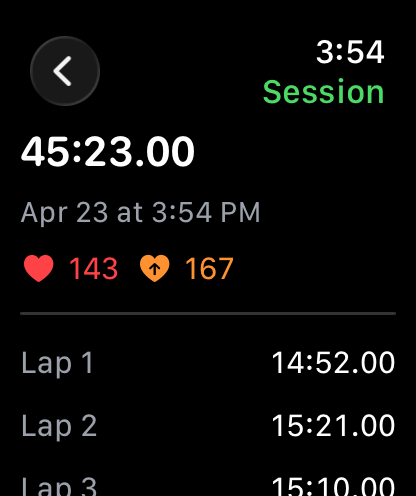
Live heart rate. Apple’s stopwatch doesn’t surface heart rate. In Stopwatch Max, HR sits live on the main screen alongside your timers. One glance covers effort, split, and HR simultaneously.
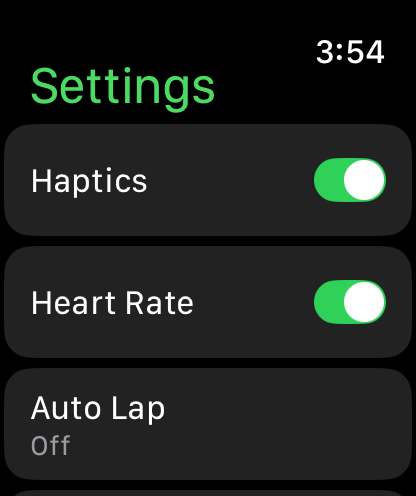
Auto-lap. Set an interval and let the watch lap automatically — useful for pool swimming, treadmill intervals, or any structured session where hitting buttons isn’t practical. Apple’s stopwatch has no equivalent.
Side by side
| Feature | Apple Stopwatch | Stopwatch Max |
|---|---|---|
| Total elapsed time | Yes | Yes |
| Current lap timer | No | Yes |
| Completed lap list | Yes | Yes |
| Session history | No | Yes |
| Live heart rate | No | Yes |
| Auto-lap | No | Yes |
| Double-tap to lap | No | Yes |
| Side button to lap | No | Yes |
| Siri lap shortcut | No | Yes |
| Watch face complication | No | Yes |
| Data saved on-device | — | Yes |
Which one to use
Apple’s stopwatch is fine for timing something once and moving on — a pasta boil, a parking meter, a coffee brew. For training, it falls short as soon as you care about more than the total number.
If you run intervals, lift sets, swim laps, or do anything that requires knowing this effort — not the last one, not the total — Stopwatch Max gives you the display, the history, and the HR data that Apple left out.
Download Stopwatch Max on the App Store
All data stays on-device. No accounts, no tracking.