 Stopwatch Max Blog
 Your Apple Watch stopwatch forgets every workout. Stopwatch Max doesn't.
Apple's stopwatch has no memory — every session vanishes when you reset. Stopwatch Max 1.5 saves your workout history, laps, and heart rate automatically.
You finish a hard interval session, stop the clock, lower your wrist — and it’s gone. Apple’s stopwatch has no memory. No laps, no heart rate, no record.
The problem with forgetting
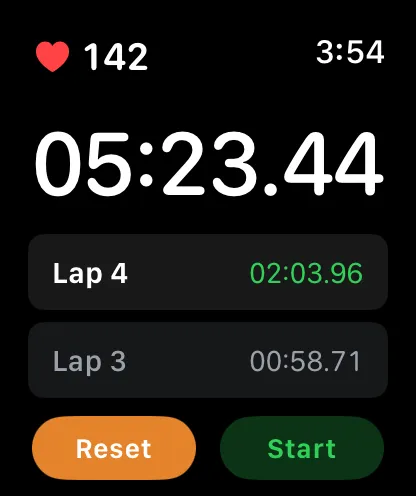
Apple’s stopwatch shows laps in the moment. The second you reset, everything disappears. There’s no way to look back at last Tuesday’s intervals, compare rest times across sessions, or see how your heart rate moved through a workout.
For casual timekeeping, that’s fine. For anyone using their watch to train, it means every session starts with zero context.
Session history
Stopwatch Max 1.5 gives your Apple Watch stopwatch a history. Every session is saved automatically — no setup, no sync, nothing to configure. Stop the timer and the workout is logged: date, total duration, every lap split.

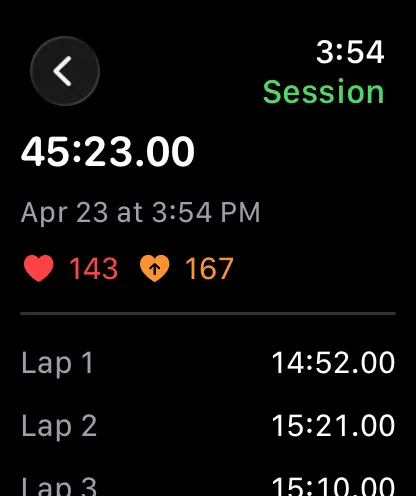
Tap any session for the full breakdown: each lap, average heart rate, and max heart rate for that effort. If you ran five 400m reps last week, you can pull up the exact splits and HR data before you do them again today.
Every session you run from here gets saved.
Live heart rate with every lap
Heart rate isn’t new in Stopwatch Max. In 1.5 it gets out of the way when you don’t need it — the HR pill hides automatically when heart rate monitoring is turned off. No empty space, no placeholder.
When heart rate is on, it sits live alongside your global timer and current lap time. Your effort, your split, your HR — one glance, no switching.
New settings: haptics, auto-lap, heart rate
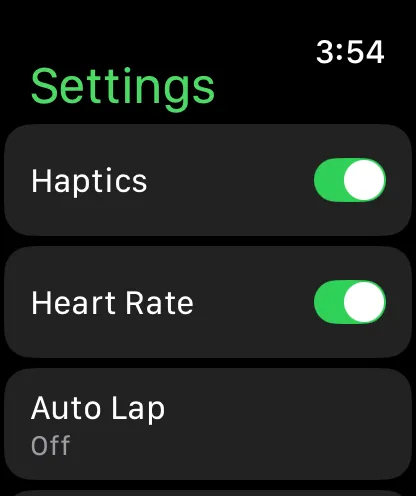
| Setting | What it does |
|---|---|
| Haptics | Toggle wrist taps on lap capture on or off |
| Heart rate | Enable or disable monitoring entirely |
| Auto-lap | Set an interval and let the watch lap automatically |
| Timer refresh rate | Trade battery for precision, or precision for battery |
Stopwatch Max 1.5 is out now.